Posts

Showing posts with the label WCF Service

Hosting WCF Service 4.0 in IIS 7.5
Image
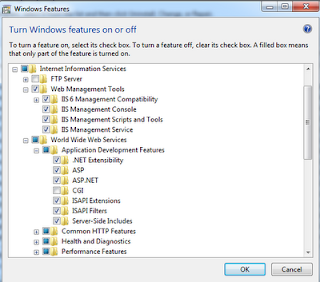
Hi Everyone, Today I want to show you what I did to get my WCF Service hosted on my development machine IIS (this could be your web server too). I am using VS 2010, .NET 4.0 framework, and IIS 7.5 in Windows 7 environment. In this demonstration I am going to use my AlkitabWebService.svc found in this post: Silverlight 4 Simple Project Part 2 (WCF Service) . Step 1 - Enabling IIS + ASP.NET Registration Click Start -> Control Panel -> Programs -> Programs and Features. On the left tab, click Turn Windows Features on or off. Turn on the features below and click OK. When you go to http://localhost , you will now see the IIS7 homepage. Now go to a command prompt and run aspnet_regiis: Step 2 - Publish the WCF service from VS 2010 Right-click the project and click Publish. Choose 'File System' as Publish method, and type C:\inetpub\wwwroot\AlkitabWebService\ This will create a folder for your WCFService that you can refer to from IIS in the next step. S...

Silverlight 4 Simple Project Part 2 (WCF Service)

Image
Silverlight 4 Simple Project Part 1 (Overview & Database) Here I will create a WCF Service as a middleman for our Silverlight Alkitab Database that I mentioned in Part 1. New Project & LINQ to SQL To start, I will create a WCF Service Application from Visual Studio 2010 (I didn't choose WCF Service Library because we will host it as a 'web' application in the future). Then right-click the project, Add New Item -> LINQ to SQL Classes. We want to drag our two tables from the Server Explorer into the dbml file. This will provide us the DataContext we require for performing our queries. WCF Service Next, rename Service.svc and IService.cs to friendlier names like AlkitabWebService.svc and IAlkitabWebService.cs IAlkitabWebService.cs is the interface class for our service. This will hold all the OperationContract (functions) declarations and any DataContract (web class) that you want to create along with its DataMember (class property). Here I have s...