Posts

Showing posts with the label jQuery / jsRender / Knockout

Knockout + JavaScript + Validation useful custom bindings and functions

Hi, Just to post some helpful bindings and JavaScript functions that I used multiple times throughout my projects. I have been using this in creating forms using jQuery and Knockout with Ajax web services. DatePicker Update: be careful if you need to deal with different timezone as client timezone and server timezone might not be the same. To avoid this issue altogether you can use knockout-jqueryui extension so that the value is written as string. This way we only need to deal with server timezone. Radio Yes/No buttons Synchronous ajax call (normally used to populate dropdown values) Get QueryString IE9 Filter problem That's all for now. Hope this helps. Andreas

Google Geocode JavaScript Address Validation

Image
I got a chance to play around with address validation using Google geocode API v3. In my case I use the client side geocoding technique to submit full address (street address + suburb + state + postcode) to find out whether the results returned. The suburb, state and postcode is coming from a proper list. What I found out with Google geocode is that when you submit full address, it also returns result with partial_match and they don't give an easy filter to exclude these results. Since I will always submit a full string address, I will just get the address when there is no partial_match property in the returned results. So far it works quite well for my situation. HTH, Andreas

SharePoint 2013 list form headings using JSLink and jQuery

Image
In SharePoint, when you want to modify the list forms, there are couple of ways that you can go about it such as modifying the form or creating custom form using SP Designer or Infopath, or creating custom aspx using Visual Studio. All those approaches can take a while to implement. With SP2013 with the JSLink functionality, we can quickly inject the headings using jQuery if you just need simple headings or HTML like this: In this case, I have a solution created in my VS2012 to create the site columns, content type and then the list itself for easy deployment. I then created a JavaScript file to be deployed to my Style Library (or you can choose other location) that contains the jQuery code: In the schema.xml of my list, inside the Forms tag you just have to add your JSLink attributes pointing to your jQuery file and the JSLink file: And there you go :) HTH, Andreas

CRM 2011 Early Bound Entities Serialization / Deserialization

Hi all, Just want to tell my experience regarding this topic - maybe it will save your time. Crmsvcutil gives you generated entities file which can be a time saver. This is all good until you want to use those entities on client side (in my case I want to bring them to my knockout JS functionality combined with AJAX and web services to provide better user experience) Serialization = works fine (when I retrieve the records). The trick is to use JSON .NET  , and with the help of Partial class you can extend the generated entity class from crmsvcutil. To get all properties serialized you need to use the [JsonObject(MemberSerialization.OptOut)] attribute on that partial class as well. Deserialization  = The problem appears when you try to deserialize (when I try to save the records). The AttributeCollection class becomes the culprit in this, complaining that it Cannot create and populate list type of AttributeCollection . Looking at the JSON Stringify ajax data that ge...

jQuery chart or graph printing cross browser

Image
Hi all, sometimes we want to produce a fancy graph or charts on our client side code. There are numerous libraries out there to assist with this requirement.  Having used jQuery, when searching for a plugin you will first notice the free jqPlot . In fact this is what has been used in the website I work with. The graph looks fine when generated. When the users asked for a printing functionality - this is where all the fun begins, the graphs screw up (either not showing or position has shifted) in certain browsers. There are three factors to look at when you encounter this issue: 1. Your print.css file 2. Whether you show your graph in a modal window (such as jQuery UI dialog) 3. Cross-browser issue Normally what we want is to just use window.print instead of specific print functionality provided by the 3rd party library if they exist. This is because we want to print other content as well and not just the chart. After searching for alternative library, I cam...

SharePoint 2013 - Read web part properties with client side JavaScript.

Hello, Sometimes we want to be able to read web part properties on our client side code, e.g. when we want to use jQuery functionality to implement certain requirements. Easiest way to achieve this is just use the asp:HiddenField control to store the value of the property, then get the value using jQuery. So on your html: Then on the JavaScript section: On your ascx code behind file, just store the value during page load: Hope this helps, Andreas

SharePoint 2013 Rest API and Knockout JS

Image
Hi all, Most of the times in public facing websites you want to have a nice fast interaction for users to be able to get the information and we want to display it in a nice looking way. For example a simple question with responses like this: where user can click Yes or No and the response will show and they can go to the next question.  To achieve this we can easily leverage SharePoint capabilities for storing the questions in the list and access them through the REST API. For rendering and interaction we will use the mighty Knockout JS making it all nice and easy. First step is to create your SharePoint list to store your questions: Then you can create a web part to host this little wizard. In your visual web part ascx file, the first thing we want to do is to create a viewmodel and get the data from our list. Using the REST api and with the help of knockout mapping (or wrap) we can get our observables easily. Below is the complete js on my page Then...

Mixing User Controls with Knockout JS - How to make it work

Hi all, Just want to let you know quite an awesome way of building your web form or application using by mixing server side and client side technologies. The trick of using knockout js wrapped in separate user controls is very simple: use native binding ! Then you will be able to use normal controls like this: You can grab all the benefits of fast asynchronous client side script. All server side logic can be implemented using web services. Just keep in mind that it is always better to do validation on both ends (i.e. form validation and saved object validation) Other tip: Sometimes when object is too large IE will complain about slow running script. This occurs especially when you are using mapping plugin. Good workaround is to separate your bindings into chunks or just map your properties manually but sometimes using the setTimeout trick works. Hope this helps, Andreas

Knockout and SharePoint - Simple Example

Image
Hi All, As you all know, client side technology is powerful and I am a fan of it. Apart from being fast and no postback is required, it is relatively easy to develop compared to hefty server side code. However you should keep in mind that your code can be easily tracked and downloaded so if you have sensitive information and logic that needs to be secured then you need to use server side code :) You can do hybrid application though and that is probably the best way to go. In this example I will show you how easy to get the data out of SharePoint list and display it with a little user interactivity. This web part consists of a user control and it basically displays a land mass comparison in boxes. Most of the times people do not realize how big WA is in comparison to their own country and when they come here they find out that they need 1-2 days to get to the other region. End result will look like this: We will be using: 1. jQuery  +  Knockout 2.1.0  fo...

jsRender for complex display rule

Image
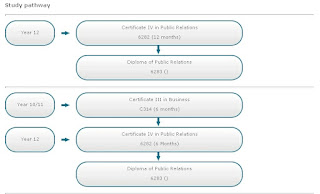
Hello Everyone, So it comes to a point where I have a set of data in front of me and I want to render those data in a quick and easy way. I don't like rendering html through code behind because it is just cumbersome and hard to maintain. Also, it is not that simple to display these data because there needs to be some logic when rendering each record. This is where I thought that jsRender would be the perfect thing to use! I have used jQuery template before and  I found it quite useful but they did not continue that project. jsRender is still active in development and it is proved to be much powerful and faster (as it's claimed to be) and fortunately it is very easy to use as well. To cut things short, the sample data looks like this: Entity: CourseOutline Attribute: PathwayId (each CourseOutline can have more than 1 pathway) PathwayLineNo (1-5) EntryPoint (e.g. Year 12) Duration (duration of the Course) Product (this is the Course Product entity with Product Name...

Music Website New Look! (HTML5 & jQuery)

Image
Hello All, I am excited to say that my music website  http://pianoismyfriend.com  has been refurbished and gone live! :) I built the website by myself and it was a really good personal project and it allows me to explore all different kind of tools and technology out there. It surprised me how we can leverage variety of existing services people have to offer without reinventing the wheels these days. Some technical information about the new PianoIsMyFriend website: LightCMS is used as the hosting and the content management provider. I moved away from WordPress because of the maintenance effort comparison and the different goal that I wanted to achieve. My website should be really simple with minimal plugins. I found it hard keeping up-to-date with WordPress versions and updating my plugins that break after updating my WordPress.  With LightCMS I was able to get my website up within a week and focus more into my content and   how it fits together...

JQuery & Knockout - A Simple Example

Image
Hi All, I have been assigned to do some client side stuff. In this case, we have some FAQ contents in CRM back-end and I want to  grab those content and display it in a user control. End result will look like this: We extensively use Knockout.js and jQuery in terms of displaying simple content. The advantage of this is that it renders much faster than using server controls. To grab the data we can use POST request to get JSON from the asmx webservice. Here is an example of displaying FAQCategory. Note that: 1. UPDATE - updated to knockout 2.1.0 . This will use native templating. 2. Grouping is achieved by creating pivot 'associative' array object :) 3. Notice multiple synchronous request? This is because the webservice is using RetrieveMultiple request (CRM 4.0) thus I need to grab attribute from related entity. Then I append the attributes to my result object. (can use FetchXML but more cumbersome in terms of parsing + slower than QueryExpression. Also, you can ...