Posts

Showing posts with the label Silverlight 4

Load and Deploy XAP into Silverlight Application through MEF Deployment Catalog

Image
What a sunny day today, and it feels brighter when everything comes into place together. Fortunately, this is also the case for MEF (Managed Extensibility Framework). At first I could not really be bothered with learning this stuff, however I found out that this framework is what I will be needing most for my project! Why? because MEF has the ability to join every piece of functionality together! Managed Extensibility Framework It basically contains three steps that you need to implement: Export : this can be any class, interface, or objects that you want to export. Import : This is the place where you can get the exported pieces and do stuff with them. Composition : Imagine this as a connector between export and import. It basically compose any/all parts that you specify in export and make them available for the import. In MEF, a piece of functionality is described as a catalog. The new deployment catalog (which I'm going to be using) is very flexible in terms of adding...
Silverlight 4 Simple Project Part 4 (Binding & Command)

Image
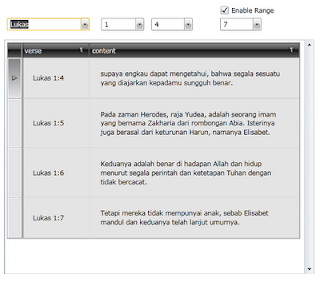
Silverlight 4 Simple Project Part 3 (MVVM Pattern) This is the last part of the blog (finally :P). In the previous post we already created our MVVM. How do we connect our View to the ViewModel? Easy! There are couple of ways to do this. We can do it declaratively in XAML or we can do it in the code-behind. View - View Model & Binding I will choose the first option. Looking at the XAML snippet above, we declare our ViewModel as a User Control Resource and set the DataContext of our main grid to that resource. Having done that, now we can easily do our data binding for our user elements. How cool is that? We don't need any code-behind at all for our XAML! This is the beauty of MVVM Pattern. Now when we select our book title, chapter, or verse, we will get our results back in the grid without any postback since all calls are made asynchronously. Command Another new feature in Silverlight 4 is the built-in Commanding option. In this project, if you look a...

Silverlight 4 Simple Project Part 3 (MVVM Pattern)

Image
Silverlight 4 Simple Project Part 2 (WCF Service) In Part 2 we already created our WCF Service that can return some results to us when functions are called. In this post I will start building my Silverlight Application :) Silverlight Project Create new project inside the same solution. Choose Silverlight Application and name it AlkitabApplication. Right-click the project and choose Add Service Reference. click Discover and you can see that our AlkitabWebService.svc is shown. Easy! In the above picture you can also see that I created three new folders called Model, ViewModel, and Views. Move the MainPage.xaml to the Views folder. Model View View Model (MVVM) Pattern For those who are new to this term, you can read this. Otherwise you might want to move on. MVVM is just a pattern. There is no strict procedure on how to implement it. This pattern is created for developers to separate the logic of their application, providing a nice way to do unit testing and creating blendability between ...

Silverlight 4 Simple Project Part 2 (WCF Service)

Image
Silverlight 4 Simple Project Part 1 (Overview & Database) Here I will create a WCF Service as a middleman for our Silverlight Alkitab Database that I mentioned in Part 1. New Project & LINQ to SQL To start, I will create a WCF Service Application from Visual Studio 2010 (I didn't choose WCF Service Library because we will host it as a 'web' application in the future). Then right-click the project, Add New Item -> LINQ to SQL Classes. We want to drag our two tables from the Server Explorer into the dbml file. This will provide us the DataContext we require for performing our queries. WCF Service Next, rename Service.svc and IService.cs to friendlier names like AlkitabWebService.svc and IAlkitabWebService.cs IAlkitabWebService.cs is the interface class for our service. This will hold all the OperationContract (functions) declarations and any DataContract (web class) that you want to create along with its DataMember (class property). Here I have s...

Silverlight 4 Simple Project Part 1 (Overview + Database)

Image
Howdy! This will be my first technical blog. The motivation behind this is that I love learning Silverlight (and it's version 4 now!). So I decided to create my own simple project as I am thinking of building a website for my church community group in the future. Overview: Why not start with a simple module? I want to be able to search for a bible verse in a quick way and no hassle of having to spend much time on it. Therefore I want the users to be able to select the book title, chapter, and verse (or verse range) and have the contents showed in front of them straight away! Here is a video showing the completed application with some explanation: Database: Now.. I found out that there are already some English bible web services out there. However since my community is Indonesian, I want to have an Indonesian bible, and it turns out that there is none! and there is no SQL formatted database dump available either :( However, I could find the text format of the bible....