Happy New Year Everyone ! This is my first new song in the new year ^_^ For you who don't know, my youtube channel is http://www.youtube.com/nevrene All the best and hope you can achieve your dream in 2011!
Posts
SharePoint 2007 list item print button with SSRS reportviewer

Recently I was tasked to migrate the old Asset data on Access db to SharePoint 2007. It's not difficult using 'Export to Sharepoint List' command and modified certain things such as creating new asset content type, site columns etc. I can view the list and the items. Great. but there is no print button! In Access db, they were using Access form to print the asset item. In SharePoint 2007, turns out that I have to do a bit of development to do just that. I found the nice blog on how to do this. However, I don't want to spend ridiculous amount of time playing with HTML markup to get the design I want. It is error-prone as well in terms of printing etc. Therefore, I decided to try using Reporting Service reportviewer control on the page that will render the layout. The list item details will be passed as parameters :) Cool! If you search google, you would find many articles about passing the parameters in the URL. this is not good since you will get ugly url and i...
.NET Convert Word Document into PDF
Howdy, I came across this old code of converting Word into PDF: This used to work well until recently the avdoc object sometimes doesn't get the instance (i.e. null) , however running it twice usually fixed it. I don't know what caused this. It might be a system update or something. I also researched that the above code shouldn't even work since it's using Acrobat interop to open a 'doc' type - so that code was kind of a hack. To fix the issue, I decided to find alternative way of converting word to PDF pro grammatically. This other way requires office 12 interop instead. So the idea is to open the doc in office and save it as PDF. Simple enough! here is the code: P.S: Don't forget to install Office2007 and Acrobat on the machine :) enjoy!
Load and Deploy XAP into Silverlight Application through MEF Deployment Catalog

What a sunny day today, and it feels brighter when everything comes into place together. Fortunately, this is also the case for MEF (Managed Extensibility Framework). At first I could not really be bothered with learning this stuff, however I found out that this framework is what I will be needing most for my project! Why? because MEF has the ability to join every piece of functionality together! Managed Extensibility Framework It basically contains three steps that you need to implement: Export : this can be any class, interface, or objects that you want to export. Import : This is the place where you can get the exported pieces and do stuff with them. Composition : Imagine this as a connector between export and import. It basically compose any/all parts that you specify in export and make them available for the import. In MEF, a piece of functionality is described as a catalog. The new deployment catalog (which I'm going to be using) is very flexible in terms of adding...
Hosting WCF Service 4.0 in IIS 7.5
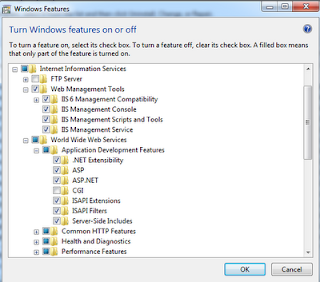
Hi Everyone, Today I want to show you what I did to get my WCF Service hosted on my development machine IIS (this could be your web server too). I am using VS 2010, .NET 4.0 framework, and IIS 7.5 in Windows 7 environment. In this demonstration I am going to use my AlkitabWebService.svc found in this post: Silverlight 4 Simple Project Part 2 (WCF Service) . Step 1 - Enabling IIS + ASP.NET Registration Click Start -> Control Panel -> Programs -> Programs and Features. On the left tab, click Turn Windows Features on or off. Turn on the features below and click OK. When you go to http://localhost , you will now see the IIS7 homepage. Now go to a command prompt and run aspnet_regiis: Step 2 - Publish the WCF service from VS 2010 Right-click the project and click Publish. Choose 'File System' as Publish method, and type C:\inetpub\wwwroot\AlkitabWebService\ This will create a folder for your WCFService that you can refer to from IIS in the next step. S...